Designing Trust: How I improved adoption of an AI native platform for Regulation SMEs
A system-level behavioral redesign that replaced a rejected Appian (low code platform) prototype with a human-in-the-loop platform built for high-stakes regulatory work.
Role
Product Designer
Duration
4 Months
Client
NDA
Status
Shipped
SMEs rejected AI that would speed their workflow due to trust
I pivoted the project from a simple UI facelift into a system-level behavioral redesign, utilizing psychology principles to build user trust and keep humans meaningfully in the loop.


Before vs after redesigning one of the major part of the workflow. Behavioral+interface changes
What my work achieved
I led UX strategy and end-to-end product design, collaborating daily in an agile loop with
Lead of Engineering & AI Lead
Aligned on LLM capabilities, token parsing limitations, processing latency, and platform constraints.
Product Manager (Internal) & Product Owner (Client-Side):
Tied user experience milestones directly to business metrics, compliance mandates, and deployment roadmaps.
Regulatory SMEs (Users & Domain Experts):
Engaged directly through contextual inquiries, A/B testing, and ongoing validation loops to ground assumptions in real-world user workflows.

Aligning on system behavior and requirements during a working session with the client Product Owner, Director of AI, and Tech Lead.
Regulation change is a complex, lengthy process involving a lot of manual work
Every time the FDIC or SEC releases a new regulation document, Subject Matter Experts (SMEs) at large financial institutions undergo a grueling, manual workflow:

The cost of making mistakes is catastrophic. To put this in perspective, in 2024 alone, the SEC collected $8.2 billion in compliance-related penalties. Furthermore, governing bodies constantly alter the Code of Federal Regulations, while these financial institutions operate globally across overlapping jurisdictions.
The AI aimed to automate this process
Our engineering team trained an AI model to automate this process. The AI broke down large documents into granular 'obligations' and mapped them automatically. Instead of manual extraction, SMEs simply needed to review the AI's work and correct it where necessary.
My research uncovered why the pilot failed:
Technical Accuracy ≠ User Adoption

To understand the friction, I looked past standard feature requests and analyzed recorded sessions of Regulation Change Analysts (SME stakeholders) working on cases in their current Excel-based workflows versus our pilot application.
Despite the high accuracy of the underlying AI model, the system failed because:
1
It didn't fit into their existing mental models or workflows.
2
They completely mistrusted the automated output.
3
They felt a lack of user agency to properly correct what the AI had generated.
4
It felt like it was slowing them down rather than speeding them up.
I mapped 4 psychology principles to understand user resistance to the pilot platform
The tendency to trust the system's output blindly over personal judgment, leading to catastrophic overlooked errors.
A lack of cognitive vigilance that occurs naturally when automated systems appear highly accurate over long periods.
Analysts losing the "big picture" understanding of the larger regulatory landscape because they didn't do the manual extraction themselves.
The fear of losing specialized expertise over time due to a shift from active production to passive monitoring.
I proposed 2 system workflow changes to build trust
Proposal 1: Allowing users to download the AI output as .CSVs to augment existing workflow rather than disrupting it completely
Proposal 2: Adding a second SME as a reviewer on each case to reduce chances of errors, implementing a mandatory "Mark as Reviewed" check on each line item

Workflow Augmentation

Export to familiar Excel layouts over forced UI adoption
Deep links to exact source document sections for easier referencing
Intentional Friction Points

Reviewer + Approver collaborative workflow
Mandatory "Mark as Reviewed" on every AI line item (Active Monitoring)
I conducted an A/B test to compare the two worflows
Speed Focus Workflow
15% error rate
~80% faster case completion
Low user confidence
VS
Active Monitoring
>3% error rate
~50% faster case completion
Higher user confidence
Due to the high risk nature of the domain, the lower error rate was prioritized over the faster case completion rates.
Design System
With the behavioral strategy validated by data, we moved forward with designing and building the entire web application platform from scratch. I established a custom design system tailored for high-density enterprise data representation.
The Product Redesign (Deep Dive)
Case Management Simplified
The existing prototype used a card layout which made it incredibly difficult to scan for information. SMEs look for specific keywords, jurisdictions, and mandates when picking or tracking cases.

AI Output Management
Traceability
Active Monitoring
Excel Integration
Reviewer - Approver Flow
For every AI-generated obligation, the UI displays the exact path of the document origin. Clicking it pulls up a split-screen viewport highlighting the exact source text inside the original PDF document, allowing easy verification.

Link to original source document for output verification
Visualizing Interconnected Data
Once the parsed obligations are mapped to a bank's existing internal compliance controls, each obligation can map to multiple controls, and vice versa. To showcase it, I created an interactive alluvial chart to give an immediate macro view of mapping density. Users can also click on individual ribbons to filter the work items instantly.
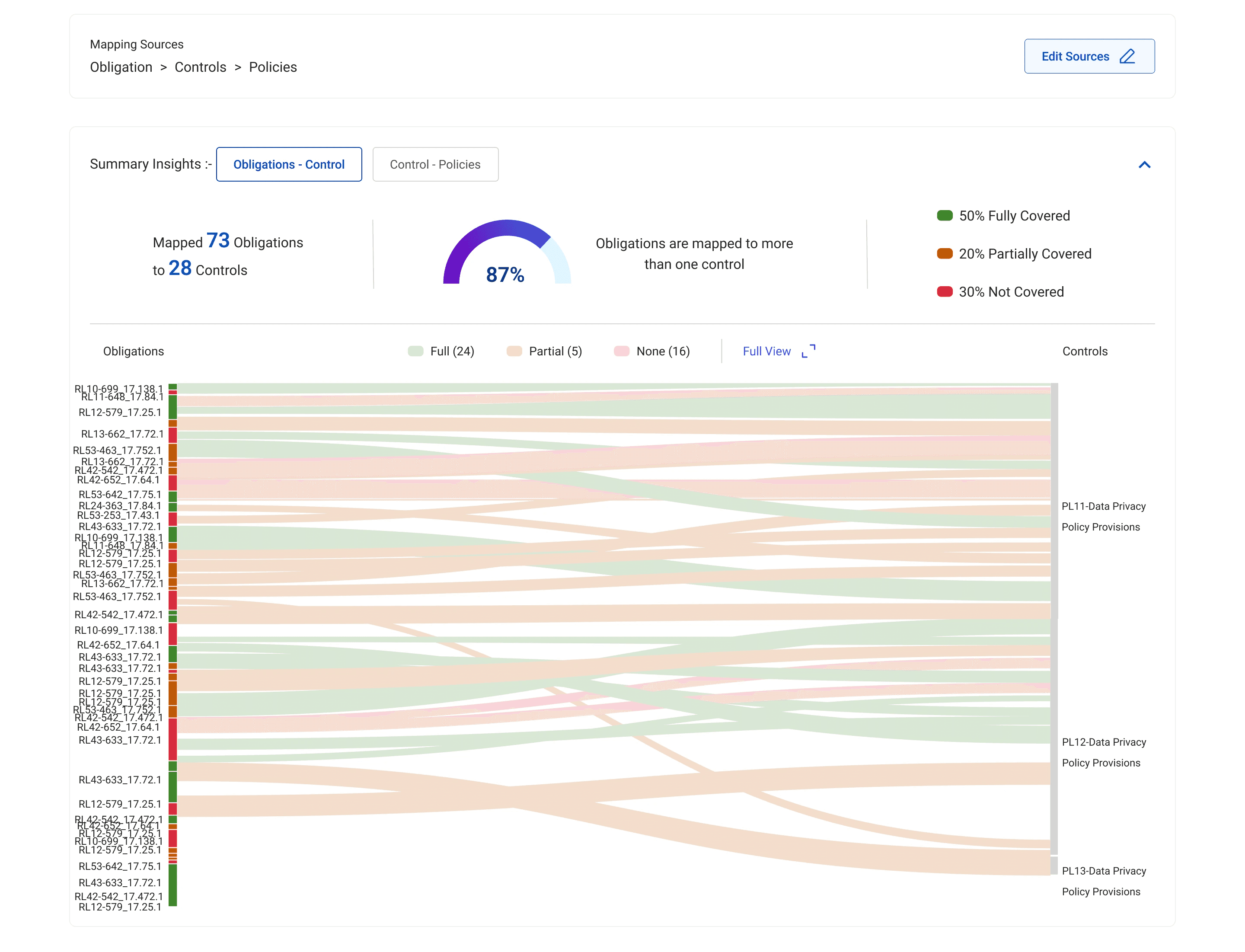
Interactive alluvial graph representing obligations mapped to control for the SME to review and approve
I also built out
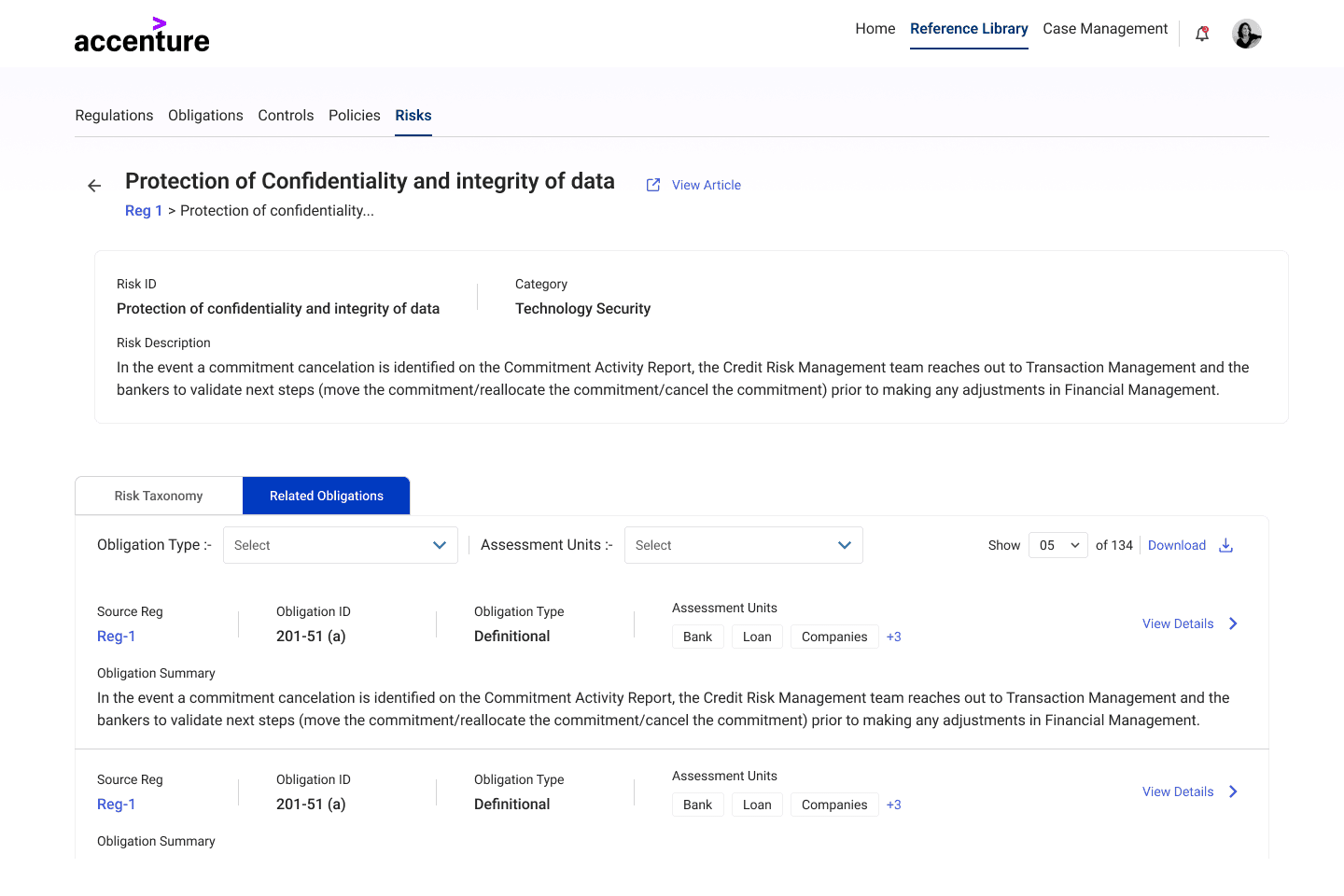
Reference library: with a network information architecture to easily access all regulations, policies, controls and explore their relationships
Case management system: to refer to older cases, and for managers to overview
And some other screens as part of the case flow that aren't covered here.




Measurable Impact & Outcomes (Post Redesign)
By pivoting away from a basic cosmetic interface update to a behavioral design transformation, the product delivered substantial human and business value upon final testing. This lead to an acceptance to adopt the platform by the client.
📉
12%
Error Reduction
(compared to pilot)
Human-in-the-loop principles improved error catching.
📈
64 → 87
SUS score
(compared to pilot)
UI/UX changes implemented improved product usability rating
📈
60%
Due to AI augmentation of workflow and platform efficiency
Key Takeaways & Lessons Learned
Measuring the right metrics
Initially the whole platform was being sold to the client as a way to speed up workflow, while the SME users judged the platform on trust and risk.
Designing for 'Human-as-editor' shift
With AI automating work, it's causing an interesting shift in users going from creators to curators of the output and UX needs to optimize for it
Enabling transitions from legacy platforms
Forcing specialized users to immediately abandon a legacy software, causes instant psychological rejection regardless of how much better a new platform is. Adoption needs to be designed for and made smoother.